HubSpot Asset Portability: What Build Once, Deploy Everywhere Means for Workflow Governance
HubSpot's new Beta feature lets Solutions Partners copy workflows straight into client portals. It solves the rebuild problem. It does not solve the governance problem.
Quick answer: HubSpot's asset portability feature, in Beta as of September 15, 2026, lets Solutions Partners copy workflows, forms, marketing emails, segments, custom objects, and agent templates from their own portal directly into a client's portal through the Client Access Manager. The copy is a one-time transfer, not a live sync. Once an asset lands in a client portal, it becomes independent: a later change to the original has to be copied over again to reach that client, and every client who already has a copy keeps whatever version they were given.
What HubSpot actually shipped
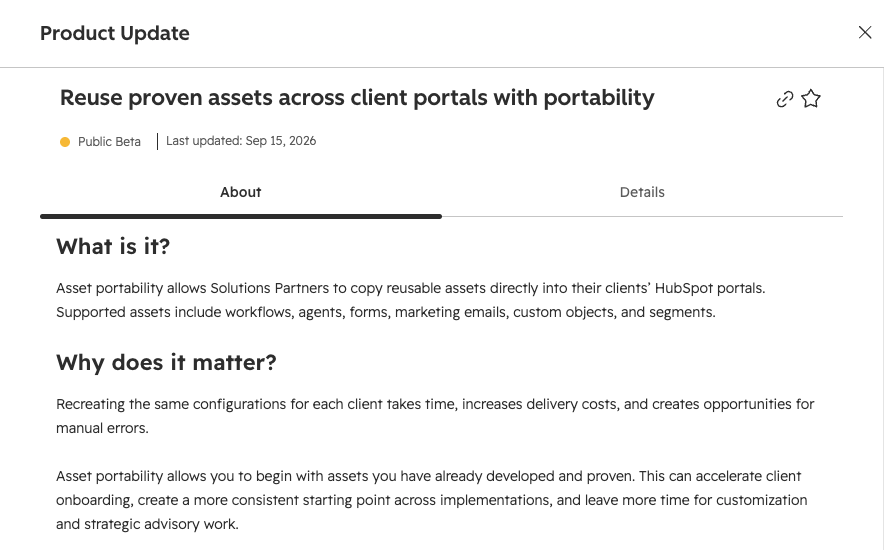
Asset portability, formally titled "Copy partner assets to client accounts," is available to Solutions Partners on a Partner Account subscription. It lets a partner build something once, in their own portal, and push it into a client's portal without rebuilding the logic from scratch.
Six asset types are supported, each copied with specific limits:
Agents. Custom agent templates copy over, but only the objective, actions, and input. Nothing else in the agent configuration transfers.
Workflows. Any workflow not created in Agent Hub. Workflows built inside Agent Hub are excluded from the current Beta.
Forms. Form names and fields. Submission data does not travel with the copy.
Marketing emails. Automated marketing emails specifically, not one-off sends.
Segments. Segment names and their filter criteria.
Custom objects. The object itself and the custom properties associated with it.
The process runs through Partner > Client Access Manager. A partner selects a client, picks which asset types to copy, reviews what data each type carries, then selects the specific assets. HubSpot automatically pulls in any connected assets a selected asset depends on. If a workflow enrolls contacts based on a form submission, the form comes along whether or not it was explicitly selected. Before anything transfers, HubSpot surfaces conflicts that would block the copy, such as a workflow type the client's subscription does not support. The partner reviews a final summary, then starts the copy. A copy history log tracks who copied what, when, and whether it succeeded, per client.
The pitch: build once, deploy everywhere
HubSpot's own framing for this feature is direct: recreating the same configuration for every client takes time, adds delivery cost, and opens the door to manual error. A partner who has already proven a lead routing workflow, an onboarding sequence, or a lifecycle stage setup can now start a new client engagement from that proven asset instead of a blank canvas.
And that math holds up. An implementation that used to mean days of rebuilding branching logic, one client at a time, now starts from a working copy that only needs adapting to that client's specific fields, pipelines, and naming conventions. For a partner running the same core playbook across a book of similar clients, the time saved compounds with every new engagement.
It also changes what agencies compete on. If the base configuration is a five-minute copy instead of a two-week build, the value an agency sells shifts toward customization, strategic advisory, and the judgment to know what to change for a given client. That is the upside HubSpot is selling, and for the right playbook, it holds up.
What "independent" means the moment the copy finishes
Here is the detail that matters more than the pitch: once an asset lands in a client's portal, HubSpot's own documentation states plainly that it becomes independent from the original. There is no ongoing link between the source and the copy. If the partner improves the workflow in their own portal next month, none of the clients who already received a copy get that improvement automatically. The partner has to run the copy process again, per client, to push the update.
The dependency check runs at copy time only, and it runs against the state of the source portal at that moment. All dependencies required for an asset to function have to be copied along with it or the copy fails, which is a real safeguard. But it protects the transfer, not what happens after. Once the workflow is sitting in the client's portal, it is exactly as editable, and exactly as breakable, as anything built there natively. A client's own admin, or the partner working inside that portal later, can change a branch, delete a connected list, or repoint an enrollment trigger, and HubSpot has no mechanism to flag that the copy has drifted from where it started.
Ten client portals, ten versions of the same workflow
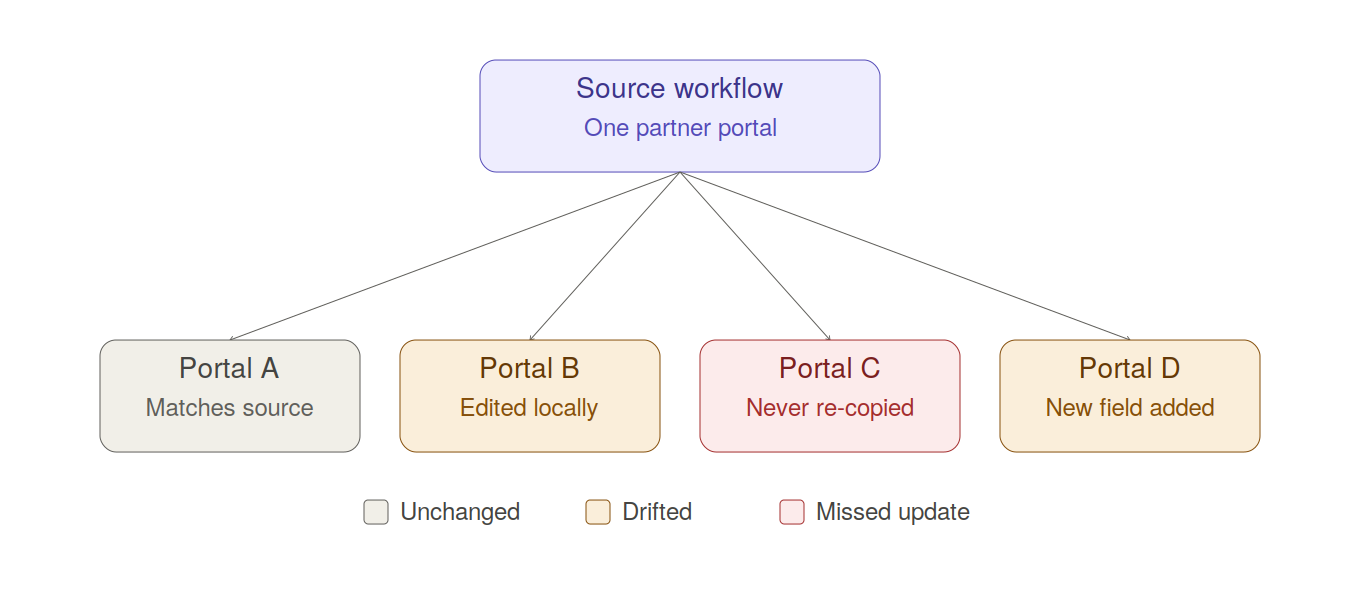
Scale this out. A partner with forty client portals, running the same lead routing workflow copied into each one, does not have one workflow. They have forty workflows that started identical and are now free to diverge independently, on different timelines, for different reasons. One client's admin adjusts a delay step. Another client's segment, which shared a name with the source but was not the same list, changes the enrollment criteria without anyone noticing the mismatch. A third portal never got the update the partner pushed to the other thirty-nine, because that client's copy history entry from two years ago is the last time anyone touched it.
This is the same workflow sprawl problem that shows up inside a single portal over time, except asset portability creates it deliberately, across a client base, on day one. The portal that used to accumulate undocumented variation over years of ad hoc changes now starts that way, multiplied by however many clients received the same base asset.
Where the blast radius review still leaves you blind
HubSpot's conflict check, run before every copy, only sees what HubSpot itself tracks: workflow dependencies, connected forms, associated emails, the assets on its own list of six supported types. It cannot see a webhook a client's developer wired into that workflow after the copy landed. It cannot see that the client's own team recreated a similarly named segment instead of using the one the partner copied over, quietly forking the enrollment logic. And because each client portal now carries its own edited version of what started as one asset, an agency auditing for a handoff, a migration, or simply a quarterly health check is no longer auditing one portal's dependency graph. It is auditing as many dependency graphs as it has clients who received a copy, each one having potentially diverged in a different direction.
Agencies that were already doing this work manually, tracing enrollment chains and checking naming conventions client by client, know how much time that takes for a single portal. Our agency audit guide covers what that process looks like today. Asset portability does not remove that work. It adds a client portal to the queue every time a proven asset ships to a new account.
Auditing a portable asset library the way you'd audit one portal
This is precisely the problem Howly was built to solve, now applied across a partner's entire client base instead of a single portal. Howly connects read-only, through OAuth, to as many client portals as an agency manages, with unlimited client portal connections under one agency account. That matters directly here: a partner copying the same lead routing workflow into forty portals needs to see all forty dependency maps, not one at a time from memory.
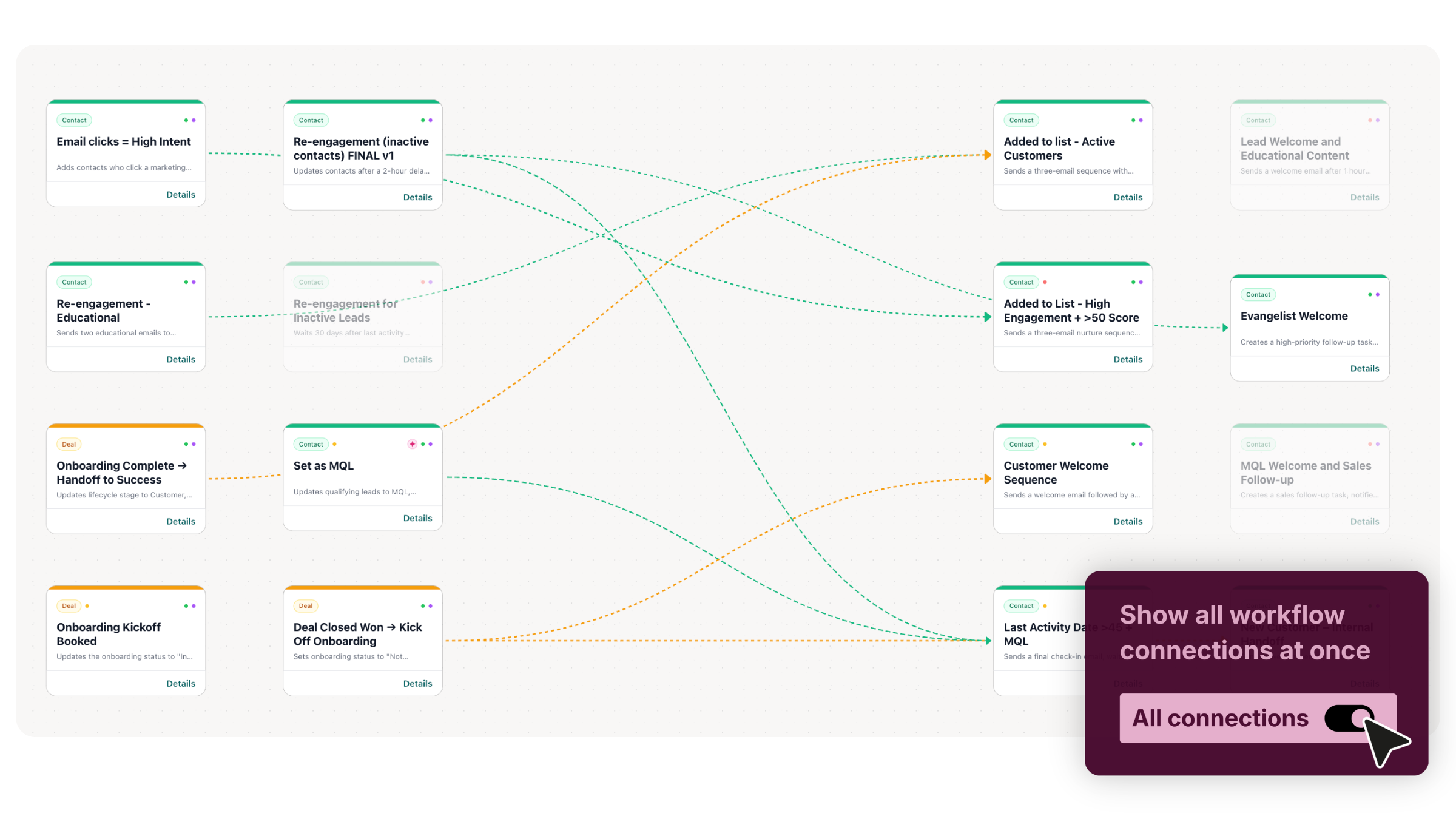
A few features line up directly with what asset portability creates:
Health Checker gives every client portal a 0 to 100 score, so a partner can see at a glance which client's copy of a shared workflow has drifted into structural trouble, and which one still matches the standard the asset was built to.
Recent Changes surfaces what moved in a given portal since the last check, which is the closest thing to a diff between a client's copy and the version the partner originally shipped.
Impact Analyzer shows the blast radius of a property change before it is made, which matters when a partner is about to edit the source asset and wants to know what breaks downstream in the portal where they are working, before touching anything.
AI Audit, powered by Claude, runs a full structural read of a portal in about fifteen seconds, fast enough to check a client's copy right after a portability transfer instead of waiting for the next scheduled review.
Branded PDF reports, white-labeled for the agency, turn any one of those audits into something a partner can hand back to a client as proof the copied asset was reviewed and is sound.
None of this replaces the judgment a partner brings to adapting an asset for a specific client, which is the actual value HubSpot is pointing partners toward. It replaces the guesswork about whether that adaptation left the workflow in a state anyone can explain six months later. QBS governs its workflows at scale the same way: not by hoping consistency holds, but by checking it.
Key takeaways:
HubSpot's asset portability feature (Beta) lets Solutions Partners copy workflows, forms, marketing emails, segments, custom objects, and agent templates from their own portal into a client portal without rebuilding them.
The copy is a snapshot, not a sync. The moment it lands in a client's portal, it is a separate asset that can drift from the source the moment either side changes.
Scaling one proven workflow across dozens of client portals means scaling the audit problem across dozens of portals too. It does not resolve it once.
Frequently Asked Questions
What is HubSpot's asset portability feature? Asset portability, documented by HubSpot as "Copy partner assets to client accounts," is a Beta feature that lets HubSpot Solutions Partners copy workflows, forms, automated marketing emails, segments, custom objects, and agent templates from their own portal directly into a client's portal. It is designed to let partners reuse proven configurations across client engagements instead of rebuilding each one from scratch.
Which HubSpot assets can Solutions Partners copy to client accounts? Six asset types are supported: agent templates (objective, actions, and input only), workflows not created in Agent Hub, forms (names and fields), automated marketing emails, segments (names and filter criteria), and custom objects along with their custom properties. HubSpot automatically includes any connected assets a selected item depends on, such as a form tied to a workflow's enrollment trigger.
Does copying a HubSpot workflow to a client portal keep it updated automatically? No. Once an asset is copied into a client's portal, it becomes fully independent from the original. HubSpot does not maintain a link between the two. If the source workflow is later improved, the partner has to run the copy process again for that client to receive the update, and any client who was not re-copied keeps the older version.
Who can use HubSpot's asset portability feature? It is available to Solutions Partners on a Partner Account subscription. To copy assets into a specific client's portal, the partner must be a Partner Admin in that client's account, must not be listed as a contractor on the partner account, and must operate in the same region as the client. The partner also needs ownership or rights to whatever they are copying.
How do I know if a workflow copied to a client portal still matches the original? HubSpot does not offer a native way to compare a copied asset against its source after the fact. The copy history log shows what was copied and when, but not whether either side has changed since. Checking for drift means auditing the client portal directly, either manually or with a workflow mapping tool that can flag recent changes and structural differences against what the asset originally looked like.
Summary
HubSpot's asset portability feature turns a real cost center, rebuilding the same configuration for every new client, into a copy operation. That is a genuine efficiency gain for Solutions Partners running a repeatable playbook. But the copy is a one-time transfer, not a synced template. The moment it lands in a client's portal, it starts diverging, and nothing in HubSpot tracks that divergence for you.
For an agency running this across a client base, the governance question does not go away. It multiplies by every portal that received a copy. Before pushing a proven workflow to the next client, connect the portal to Howly and see the full dependency map, health score, and change history before you make the next transfer.
Howly is a read-only HubSpot workflow mapping and audit tool. It maps workflow connections, flags structural issues, and shows the impact of property changes before you make them. Used by RevOps teams and HubSpot agencies managing complex portals at scale.